About
Problem
- Claude.ai has no full session export. When context fills up, long threads are hard to keep.
- Manual copy-paste loses structure, and there's no way to resume a prior conversation in a new chat without friction.
- You can't see how much context you've used until it's too late.
Solution
- clodcapture runs while you use claude.ai. No separate login, no setup.
- Captures full conversation JSON automatically as you navigate between chats.
- One-click export, bulk sync, GitHub backup, and session continuation in new chats.
Summary
| You want | How |
|---|---|
| Auto-capture a chat | Just visit it - clodcapture captures on navigation |
| Copy session to clipboard | Click Copy in popup |
| Download raw JSON | Click Grab |
| Export everything | Click Sync All - zips to Downloads/clodcapture/ |
| Resume in a new chat | Click the continue button on any captured chat |
| Quick continue (FAB) | Click the floating spider button on claude.ai |
| Select a range to continue | Use the timeline spine to pick specific messages |
| Combine multiple chats | Long-press to multi-select, continue with stacked keys |
| Push to GitHub | Configure repo in Settings, click Push All |
| See context usage | Check the gauge in the popup footer or the FAB ring |
UI
Install
Download from Chrome Web Store
From source
- Clone this repo.
- Chrome -> Extensions -> turn on Developer mode -> Load unpacked -> choose the repo folder (the one with
manifest.json). - Open https://claude.ai and use the extension popup.
How it works
Capture pipeline
- Content script patches
history.pushState/replaceStateand listens forpopstate. Switching chats triggers a capture via the service worker. - Uses your existing claude.ai session cookies to call the conversation API. No API key required for saving.
- Raw JSON stored in IndexedDB (
brainjar). Metadata indexed inchrome.storage.localfor fast popup rendering. - Background alarm refreshes captures every 30 minutes.
clawd-continue (session resume)
Resume a saved thread in a new chat:
- Distills captured JSON to
{ role, text }pairs. - With API key: Claude Sonnet builds an intelligence report (entities, arc, state, next step) - not a line-by-line replay.
- Without API key: Fallback prompt embeds session JSON directly.
- Injects into the claude.ai composer via
ClipboardEvent.
Context usage gauge
- With API key: exact token count via
/v1/messages/count_tokensagainst a 200k window. - Without: estimate via
chars / 3.5. - Shown as a segmented ring in the popup footer.
Floating Action Button (FAB)
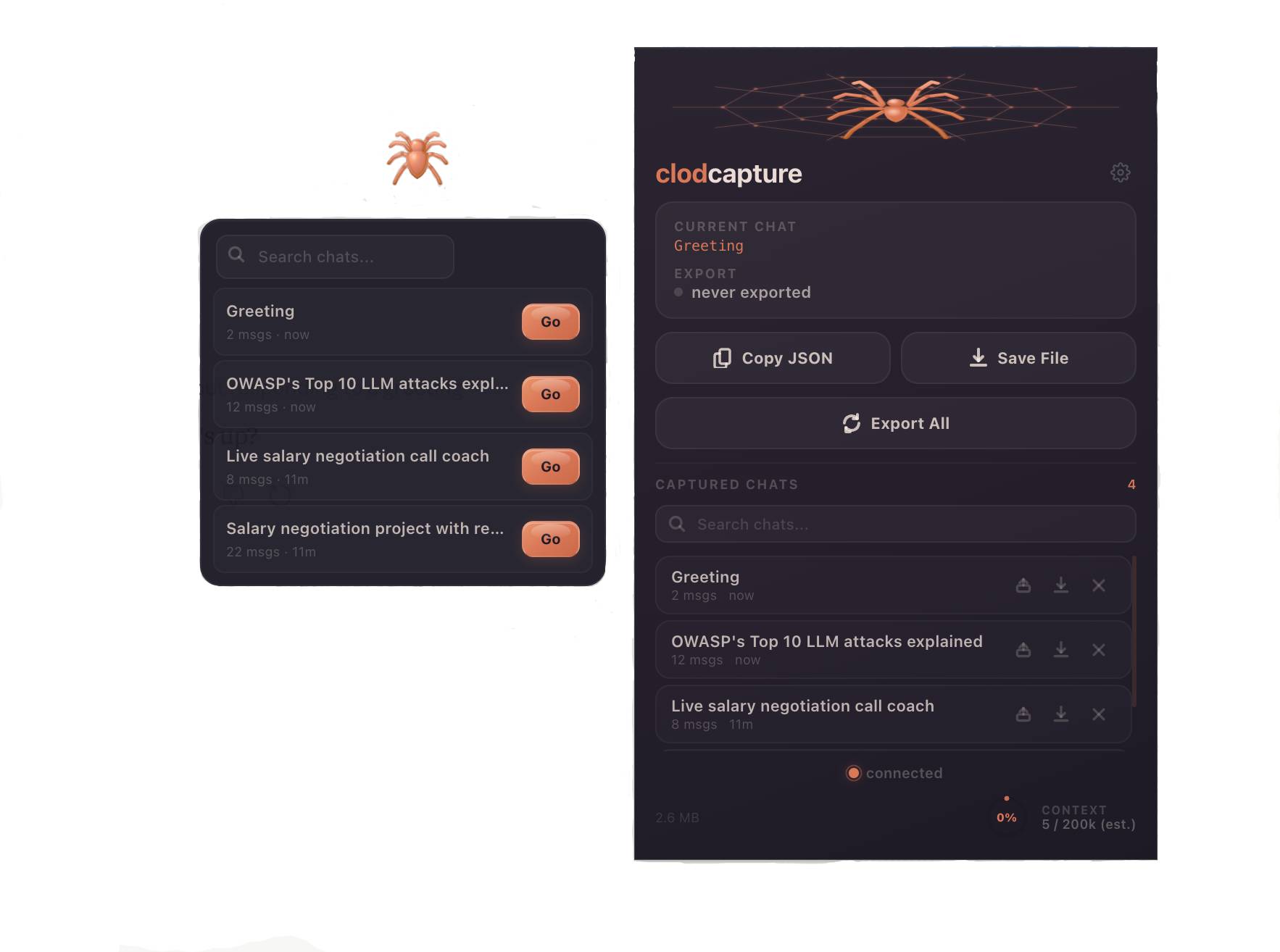
A draggable jelly spider button injected directly onto claude.ai. Click to open a mini-panel with your recent captured chats. One click to continue any session in a new chat. Toggle with Cmd+Shift+K.
Timeline Spine
Click "Go" on any chat in the FAB panel to open the timeline spine - a vertical scrubber showing every message as a proportional marker (orange = human, purple = assistant). Drag the handles to select a range. Quick-select chips: Last 10, Last 25, 2nd half, All. Live token estimate. Only your selected slice gets injected into the new chat.
Portable Chat Keys
Each chat can generate a compact summary key (~500 tokens) via Haiku. Keys contain: summary, entities (people, tools, files, decisions), arc, tags, current state, and next step. Long-press chat items to multi-select up to 5 sessions, then "Go with keys" to stack all their summaries into one new chat. Auto-tags show as colored pills and are searchable with #tag-name.
Architecture
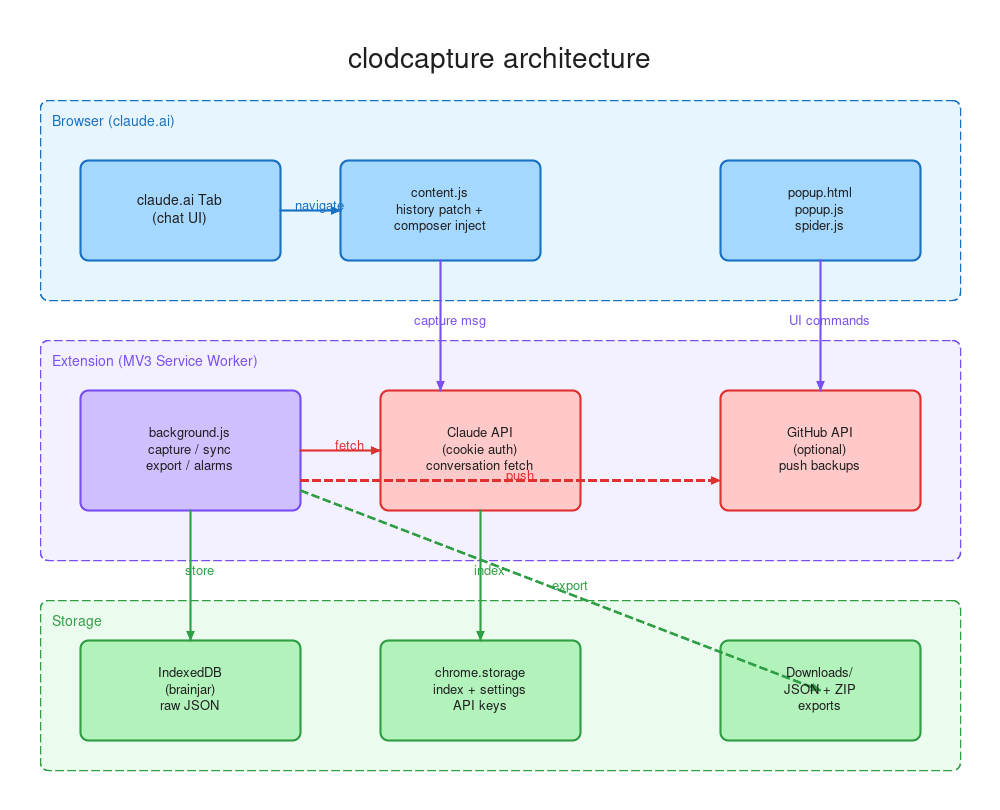
manifest.json            MV3 service_worker + content_scripts on claude.ai
  +-- background.js      capture, sync, export, GitHub push, alarms,
  |                       spine indexing, key generation, token count
  +-- content.js         history patching, capture triggers, composer injection
  +-- fab.js             floating action button, panel, chat list
  +-- spine.js           timeline scrubber, range selection, partial continue
  +-- keys.js            portable keys, tagging, multi-select, key-based continue
  +-- fab.css + spine.css styles for FAB, panel, spine, tags, liquid buttons
  +-- popup.html/js      popup UI, settings, full chat list
  +-- spider.js          3D spider canvas animation (click = bounce)
Zero runtime dependencies. ~1100 lines across 8 JS files.
Permissions
| Permission | Why |
|---|---|
storage, unlimitedStorage | IndexedDB + extension storage for captured sessions |
tabs | Detect active claude.ai tab and extract chat ID from URL |
cookies | Session-backed API calls for capture (no cookies stored or transmitted) |
downloads | JSON and ZIP exports to Downloads folder |
clipboardWrite, clipboardRead | Copy/paste workflows for session data |
scripting | Inject content script for composer loading |
alarms | 30-minute background sync |
Host permissions: claude.ai (capture), api.anthropic.com (optional token counting + continue), api.github.com (optional backup).
Settings
| Setting | What it does |
|---|---|
| API key | Enables exact token counting and AI-powered session digests via clawd-continue |
| GitHub repo | owner/repo for backup. Push captured sessions as versioned JSON files |
| Auto-push | Automatically push to GitHub on every capture |
All settings stored locally in chrome.storage.local. No data leaves your machine unless you explicitly configure GitHub backup.